
How to audit your ads.txt in an afternoon
Most ads.txt files were written once and inherited ever since. Here's a five-step audit any publisher can run today — find the contradictions, check every DIRECT claim against the other side, and cut what shouldn't be there.
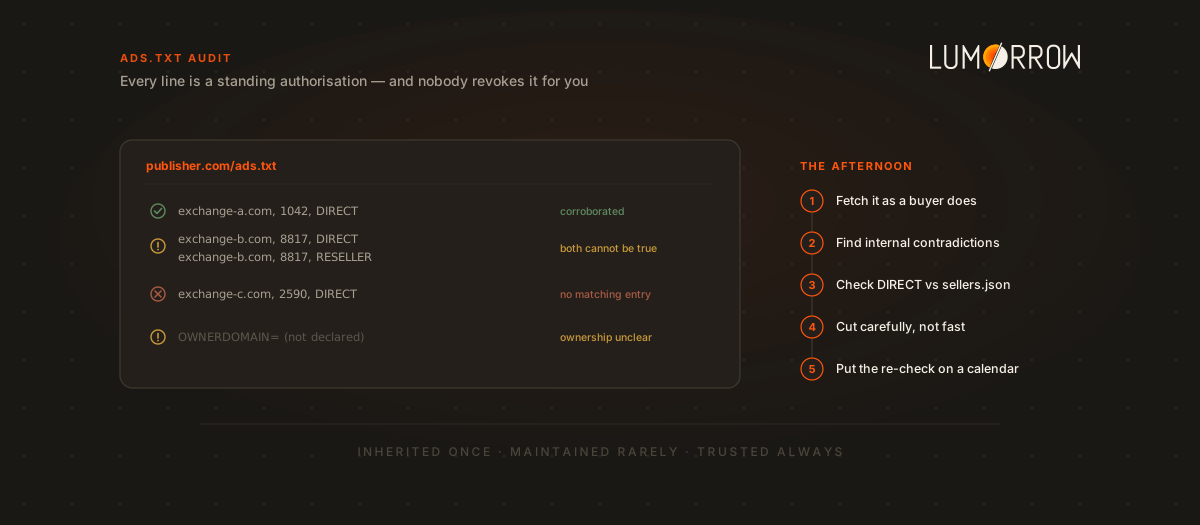
Almost nobody writes an ads.txt file from scratch. You inherit one. A partner sends over “the lines you need to add,” you paste them in, the campaign launches, and the file sits there — accumulating entries the way a garage accumulates boxes. Two years later it contains sellers nobody at the company recognises.
That matters more than it sounds, because every line in that file is a standing authorisation. It tells the entire buy side that the named company may sell your inventory. Nobody revokes it for you.
Here’s an audit you can finish this afternoon. You need a browser and a text editor.
Step 1 — Fetch the file the way a buyer does
Open yourdomain.com/ads.txt directly. Not the copy in your CMS, not the version in a Google Doc — the live file, over HTTPS, exactly as a crawler retrieves it.
Check the boring things first, because they’re the ones that silently break everything:
- It returns 200 and plain text. A surprising number of files return an HTML error page with a 200 status, which parsers read as an empty file.
- Both hostnames work. If buyers reach you at
www.and you only serve the apex, half of them see nothing. Redirects are permitted, but keep them to a single hop. - Apps need
app-ads.txtat the developer domain listed in your store entry — a different file, in a different place.
If a buyer can’t fetch the file, everything else in this post is academic. Your inventory reads as unauthorised.
Step 2 — Find the contradictions inside your own file
Now read the file itself. Each line is a seller domain, your account ID with that seller, a relationship of DIRECT or RESELLER, and optionally a certification authority ID:
exchange-a.com, 1042, DIRECT, f08c47fec0942fa0Sort the lines and look for these, in order of how much damage they do:
- The same account declared both ways.
exchange-a.com, 1042, DIRECTon one line andexchange-a.com, 1042, RESELLERforty lines down. Both cannot be true. Buyers who notice tend to trust the whole file less. - Exact duplicates. Harmless to parsers, but they’re a reliable sign the file is being appended to rather than maintained.
- Typos in seller domains. A misspelled exchange domain isn’t an authorisation for anyone — it’s just dead weight that makes a real line look missing.
- Missing
OWNERDOMAINandMANAGERDOMAIN. These declare who owns the inventory and who monetises it on your behalf. If a sales house runs your inventory and this isn’t stated, the ownership picture buyers assemble is guesswork.
Step 3 — Check every DIRECT claim against the other side
This is the step people skip, and it’s the one that finds real problems.
Your ads.txt is a claim you make about a seller. That seller publishes sellers.json — a claim they make about you. For each DIRECT line, open thatseller.com/sellers.json and find the entry whose seller_id matches your account ID.
Three things are worth checking:
- Does the entry exist at all? If your account ID isn’t in their file, the two sides don’t corroborate. Sometimes that’s a lag; sometimes the account was closed years ago.
- Does
seller_typematch your claim? You saidDIRECT, which asserts a direct relationship — so the entry should readPUBLISHER. If it readsINTERMEDIARY, that path is a reseller path, whatever your file says. - Does the
domainfield match your domain? A mismatch here often means the account was set up under a parent company, a legacy brand, or another publisher entirely.
One thing that is not an error: entries marked is_confidential. Sellers are permitted to withhold name and domain, and plenty of legitimate ones do. An absent name is not a red flag; an absent entry is.
Step 4 — Cut carefully, not aggressively
Deleting lines feels like progress. Resist doing it quickly.
Remove entries for partners you genuinely no longer work with — those are pure attack surface, authorising sales you’ll never see revenue from. But before cutting anything you merely don’t recognise, ask the SSPs you do use. Long reseller chains mean a company you’ve never heard of may sit legitimately downstream of a partner you signed last year, and pulling that line can quietly kill working demand.
The useful discipline is documentation: for every line that survives, write down who it’s for and why it exists. That note is what makes next quarter’s audit take twenty minutes instead of an afternoon.
Step 5 — Put the re-check on a calendar
An audit is a snapshot. Two things move underneath it: your own partner list, and the sellers.json files on the other side — which exchanges edit without telling anyone.
Re-run steps 3 and 4 monthly, and any time you add or drop a partner. If you’d rather not do it by hand, that comparison is exactly what Lumorrow Verify automates.
The takeaway
An ads.txt file is a standing authorisation list that most publishers inherit rather than maintain. Auditing it is five steps: confirm buyers can actually fetch it, find the contradictions inside it, check each DIRECT claim against the seller’s own sellers.json, cut stale entries carefully after asking your SSPs, then re-check on a schedule. None of it is difficult. It’s just nobody’s job — which is precisely why stale lines survive for years, and why a file that looks fine to you can look like an unauthorised path to a buyer.
If you want the background on what these files are and how they fit together, start with ads.txt and sellers.json explained. For the wider picture, see supply path optimization and the 2026 state of supply-chain transparency.
Lumorrow Verify crawls both sides of the market and reconciles them for you — free to look up any domain, no account needed. Look up your domain →